Protect and Secure Your Data Before Enabling Microsoft 365 Copilot
 Mathias Baden Frederiksen
May 18, 2024
4 min read
Mathias Baden Frederiksen
May 18, 2024
4 min read
Interest in Microsoft 365 Copilot is increasing as more organizations see its value. However, getting started can feel overwhelming.
That's why I explored 6 different Microsoft licenses to see what features they offer to protect your organization when you enable Copilot. See what's included in each license below, and find use cases for further inspiration under the matrix table.
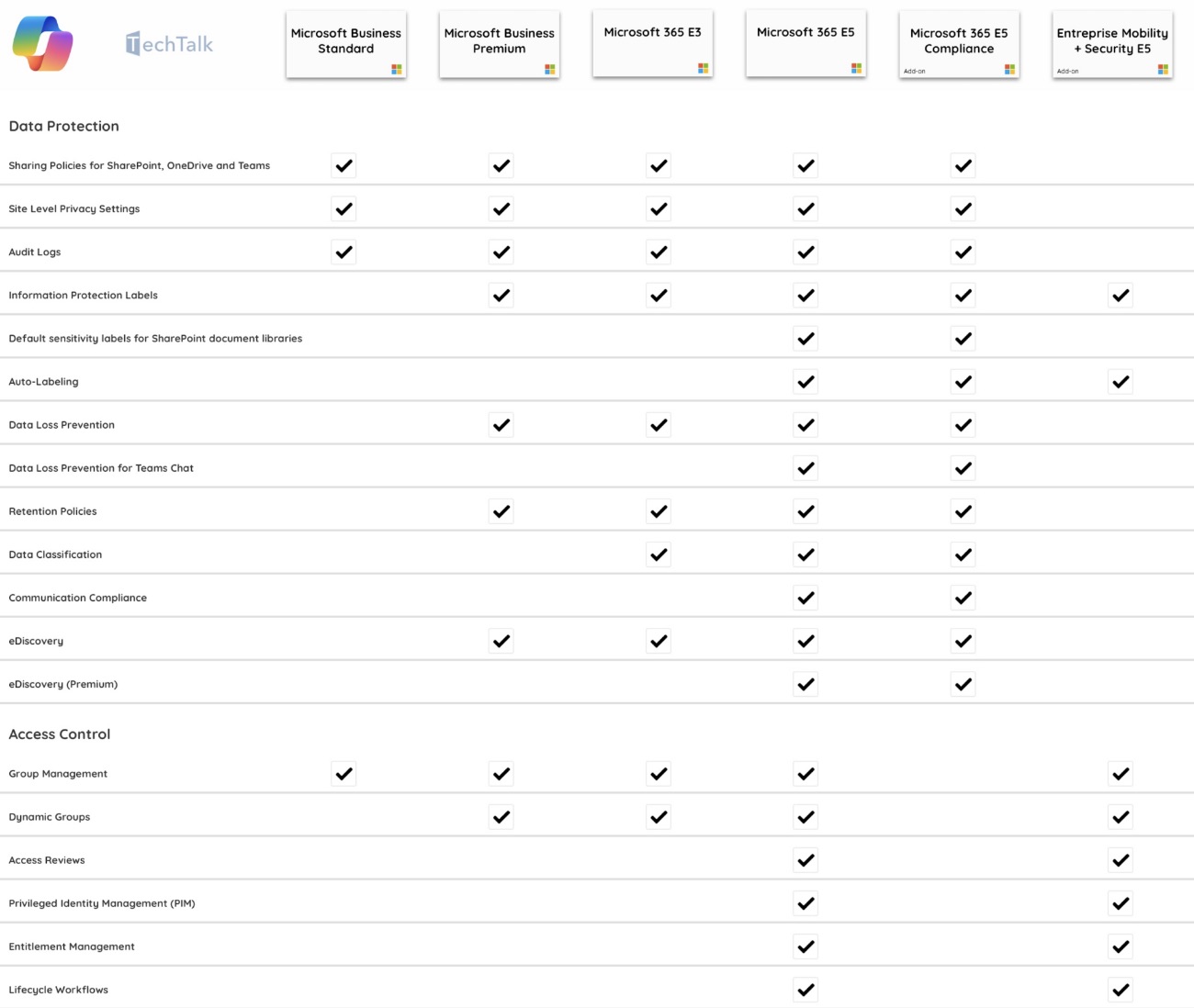
Microsoft Business Standard
1. Sharing Policies for SharePoint / OneDrive / Teams
Define internal and external sharing policies for documents stored in OneDrive, SharePoint Sites, and Teams repositories. Use case: restrict external sharing of confidential project documents in SharePoint so only internal team members can access sensitive information. Docs →
2. Site-Level Privacy Settings
Restrict access to SharePoint sites and Teams channels for public or private access. Use case: set a company-wide SharePoint site to private for employees only, while keeping the HR policies site public for all to view. Docs →
3. Audit Logs
Conduct audit log searches for interactions with content and services across your organization. Use case: investigate a data breach by searching the audit logs to track who last accessed specific sensitive documents before the breach occurred. Docs →
4. Group Management
Add or remove users from groups to manage access controls efficiently. Use case: quickly add a new employee to relevant departmental and project groups to grant immediate access to necessary resources. Docs →
Microsoft Business Premium
Includes all features from Microsoft Business Standard.
1. Information Protection Labels
Create sensitivity labels to apply to documents to control access and visibility. Use case: label financial reports as “Confidential” to restrict access to the finance department only. Docs →
2. Data Loss Prevention (DLP)
Prevent users from sharing sensitive data internally and externally, for email and files. Use case: implement DLP policies to automatically block sharing of files containing credit card numbers outside the organization. Docs →
3. Retention Policies
Retain and delete content based on your organization's requirements. Use case: set up a retention policy to automatically delete all emails and chats older than 7 years to comply with specific regulations. Docs →
4. eDiscovery
Create cases, searches, and legal holds for content across Microsoft 365 services. Use case: use eDiscovery to collect evidence from emails and documents in a case against a vendor. Docs →
5. Dynamic Groups
Automatically add or remove users from groups based on user attributes. Use case: set up a dynamic group for all employees with the job title “Manager” to automatically receive role-relevant updates and permissions. Docs →
Microsoft 365 E3
Includes all features from Microsoft Business Premium.
1. Data Classification
Create trainable classifiers to detect and search for sensitive data across the organization. Use case: a financial client uses classifiers to automatically find and secure documents with sensitive financial data — scanning emails and documents to detect sensitive information and apply measures like encryption or access control. Docs →
Microsoft 365 E5
Includes all features from Business Standard, Business Premium and Microsoft 365 E3.
1. Default Sensitivity Labels for SharePoint Document Libraries
Streamline protection of sensitive information by automatically applying predefined sensitivity labels to every document in a SharePoint library. Docs →
2. Auto-Labeling
Automatically identify and label documents containing sensitive information. Use case: when an employee saves a document with credit card data, the system applies a “Highly Confidential” label, triggering encryption and restricting access. Docs →
3. Data Loss Prevention for Teams Chat
Integrate DLP with Microsoft Teams to control sensitive information in chat. Use case: if an employee shares confidential client data in a Teams chat, DLP blocks the message, hides the sensitive information, or alerts the sender. Docs →
4. Communication Compliance
Monitor employee use of AI tools like Copilot. Use case: if sensitive information is shared, the system detects it — the compliance team then acts and updates training to prevent recurrence. Docs →
5. eDiscovery (Premium)
Search for and delete user prompts and Microsoft Copilot responses in supported applications and services — letting you manage and control sensitive information across the organization. Docs →
6. Access Reviews
Automate periodic reviews of user access for groups, apps, and roles. Docs →
7. Privileged Identity Management (PIM)
Provide just-in-time privileged access to Entra ID and Azure resources, or assign time-bound access using start and end dates. Docs →
8. Entitlement Management
Streamline identity and access management at scale by automating access request workflows, assignments, reviews, and expirations. Docs →
9. Lifecycle Workflows
Automate user access to resources during onboarding, offboarding, and internal moves within the organization. Docs →
Lead Modern Workplace Architect at Danoffice IT A/S, specializing in Microsoft technologies with a focus on security. Writing practical field notes on the modern workplace.